This is default featured slide 1 title

Go to Blogger edit html and find these sentences.Now replace these sentences with your own descriptions.

This is default featured slide 2 title

Go to Blogger edit html and find these sentences.Now replace these sentences with your own descriptions.

This is default featured slide 3 title

Go to Blogger edit html and find these sentences.Now replace these sentences with your own descriptions.

This is default featured slide 4 title

Go to Blogger edit html and find these sentences.Now replace these sentences with your own descriptions.

This is default featured slide 5 title

Go to Blogger edit html and find these sentences.Now replace these sentences with your own descriptions.

*/

Windows 10에 ESP32 IDF 개발 환경 설정

필수 구성요소 설치

ESP-IDF(Iot Development Framework)에는 Pytho, Git, Crosscompiler, Cmake, Ninja 빌드 도구가 필요하다.

https://dl.espressif.com/dl/esp-idf-tools-setup-2.2.exe을 다운받아 실행한다.

I Accept Agreement를 선택하고 다음
Python 3.7을 선택하고 다음
git은 기존 설치된 것으로(버전이 같으니..) 선택 후 다음
Download ESP-IDF 선택 후 다음
다운 받을 버전은 가장 최신 버전으로, 설치 디렉토리는 본인이 원하는 곳으로 변경 후 다음
ESP-IDF Tools이 설치될 디렉토리도 본인이 원하는 곳으로 변경 후 다음
모두 선택 후 다음
설치될 디렉토리 확인 후 "Install" 클릭하면
설치에 필요한 파일들 다운로드, 압축해제, 설치 등의 작업을 거친다.


일련의 작업이 끝나면 Finish

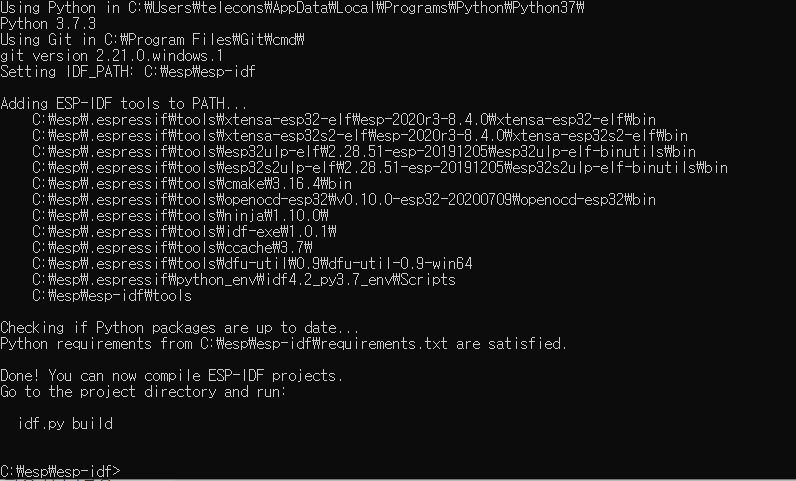
설치가 완료되면
윈도우즈 메뉴 창에 ESP-IDF Command Prompt바로 가기가 설정된다.
기존 명령 프롬프트 창에서 ESP-IDF를 사용하려는 경우 다음을 수행하면 된다.
설치한디렉토리\esp-idf\export,bat 
이거나 설치 디렉토리를 변경하지 않은 경우는
%userprofile%\esp\esp-idf\export.bat


참조 

  • https://docs.espressif.com/projects/espressif-esp-idf/en/latest/


Visual Studio Code에 ESP32 IDF 개발환경 세팅하기

ESP-IDF VS Code Extension

Visual Studio Code에 Espressif IoT Development Framework을 개발, 빌드, 롬라이팅, 모니터링, 디버그 등을 지원

목차


전제조건

Extention을 설치하기 전에 사용하고자 하는 환경에 따라 아래의 프로그램들을 설치해야 한다.

LinuxMacOSWindows
Python 3.5+Python 3.5+Python 3.5+
PIPPIPPIP
GitGitGit
CMakeCMakeC++ Build Tool
Ninja-buildNinja-buildRust

Windows에서 C++ Build Tools 설치

위의 링크에서 다운받은 설치파일을 실행 시키고 첫번째 항목("C++ build tools")을 선택하고 Install 버튼을 누른다.

설치가 완료되고 나서 설치가 잘되었는지 아래와 같이 확인한다.

윈도우 시작메뉴 에서 Development Command Prompt for VS를 실행시킨다.


Command prompt에서 cl.exe 명령어를 실행했을 때 아래와 같이 실행되는지 확인


ESP-IDF Extension설치 하기

VS Code에서 Extension 메뉴를 누르거나 <Ctrl> + <Shift> + <x> 키를 눌러 EXTENSIONS: MARKETPLACE 검색창에 "esp32" 를 입력하여 Espressif IDF를 찾아 install 한다.


install이 끝나면 메뉴에서 View -> Command Palette 에서 "configure esp-idf extension"를 입력하여 "ESP-IDF:Configure ESP-IDF extension"을 선택한다.

EXPRESS를 선택

ESP-IDF 컨테이너를 설치할 디렉토리를 변경하고자하면 변경하고 아니면 그래도 install버튼 클릭


설정이 끝나면 해당 윈도우를 닫는다.


Ubuntu에서 버전 확인

 lsb_release 

$ lsb_release -a


cat /etc/os-release


애플망고 싹틔우기

몇년 전에 애플망고를 먹고 싹을 틔운적이 있어, 다시 한번 시도 해보았다.

먼저 과육은 먹고 씨껍데기의 가장자리를 잘라 벌리면 씨앗이 나온다.

조그만 그릇에 씨앗을 넣고 물을 씨앗의 절반 높이 정도로 채우고 1~2주 기다리면 뿌리가 나오는 것을 확인 할 수 있다.

21.3.27


21.4.06 
 씨앗에서 뿌리가 조금 나온것을 볼 수 있습니다.
21.4.10
  뿌리가 길어졌네요.


사과꽃

 옥상에서 키우는 사과나무에 꽃이 활짝 피었다.


작년에는 관리 부족으로 3~4개 수확하고 끝났는데 올해는 기대해 본다.

관련글


안양천/가산동 벚꽃

안양천에 벗꽃이 활짝 피었네요. 점심 식사 후 가볍게 나갔다 왔습니다. 주말에 비오고 나면 다음 주에는 못 볼 것 같네요.


관련글

살구꽃

 옥상에 심어둔 살구나무에 꽃이 활짝 피었네요.


관련글